


Seizmic FP&A
Financial Planning and Analysis Software, Powered by AI
Discover powerful financial planning and analysis software with Seizmic. Improve budgeting, forecasting, financial reporting and advanced analytics to drive smarter and faster business decisions.
Budgeting
Forecasting
Financial reporting
Advanced analytics
FP&A on Microsoft Fabric
Budgets, forecasts and board packs from your ERP, in one governed model.
Seizmic connects to Microsoft Dynamics 365 Business Central and other ERPs such as SYSPRO, Sage, SAP and NetSuite, runs your budget and forecast cycles, and produces the management statements your board reads. Wingman, our AI assistant, answers questions about the numbers in plain English, with the source behind every answer. And through MCP, the same governed numbers are available inside Claude and Microsoft Copilot.
Live in 6 to 8 weeks
Built on Microsoft Fabric and Power BI
Connects to Claude and Copilot via MCP
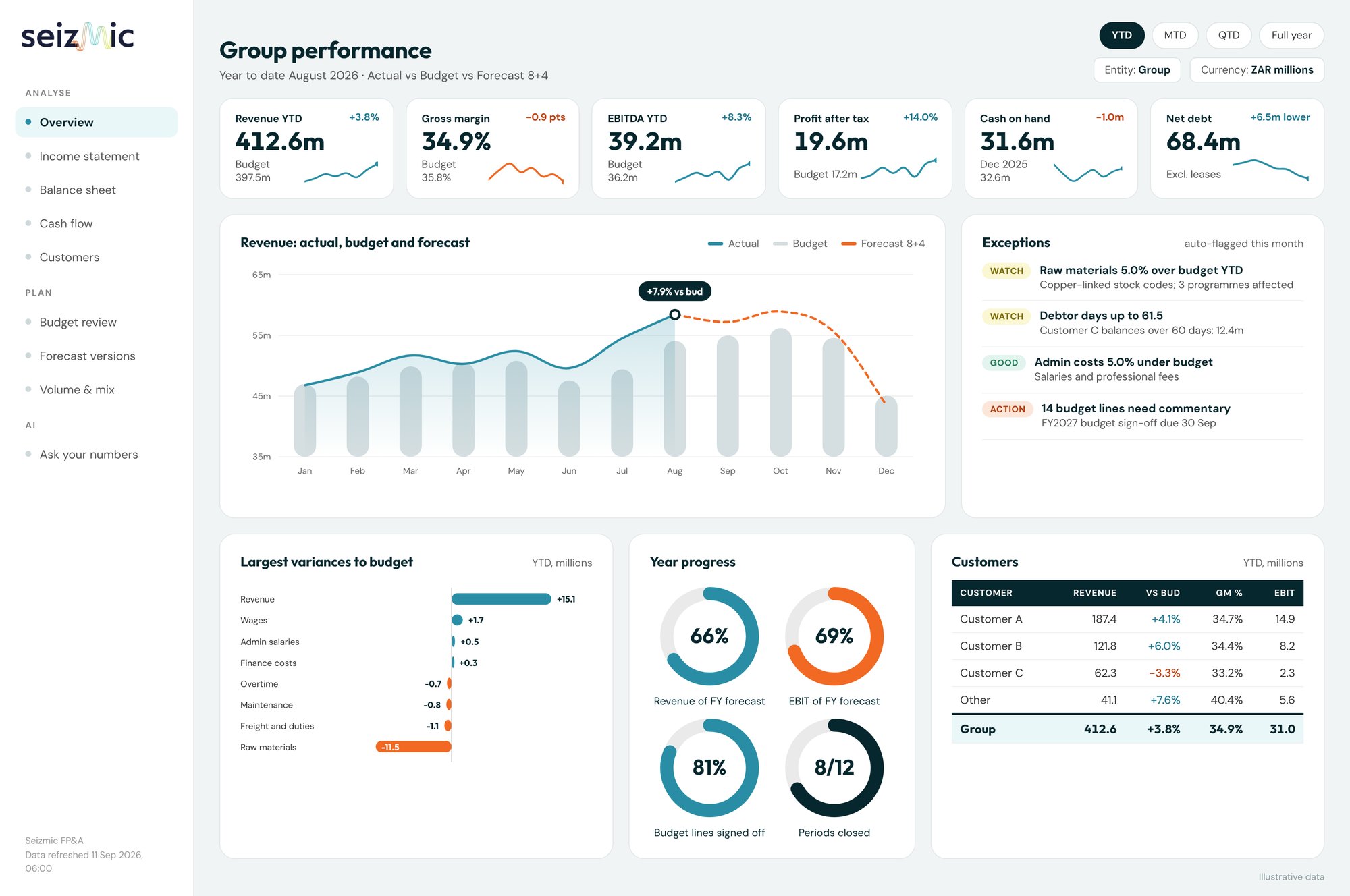
Illustrative data. Click a screen to open it full size.
Manufacturing
Manufacturing & FMCG
Commodity export
Financial services
Microsoft Dynamics 365 Business Central
SYSPRO
Sage
SAP
Oracle NetSuite
and other ERPsWhat Seizmic does
One platform for the three jobs finance does every month
Most FP&A tools solve one of these and leave you exporting to Excel for the rest. Seizmic does all three from the same model, so the budget, the report and the answer always agree.
Plan
Budget and forecast in one place
Driver-based budgets, rolling forecast versions, volume and price planning by customer, and contributor commentary with approval status.
Report
Management packs that build themselves
Income, manufacturing and admin statements by entity or customer, against budget, forecast and prior year. Delivered in Power BI, Excel or Word.
Ask
Answers in Claude, Copilot or Wingman
Ask in the AI assistant your team already uses. Every answer reads the same governed model as your reports, so it traces back to a ledger line.
How Seizmic helps FP&A teams
Everything an FP&A team does, in one platform
From the annual budget to the board pack, from variance commentary to scenario planning, Seizmic gives the finance team one governed model to work from, and the tools to do each job faster.
01
Budgeting
Budgets by business unit, cost center and GL account, collected in one place and rated for commentary quality before sign-off.
02
Forecasting
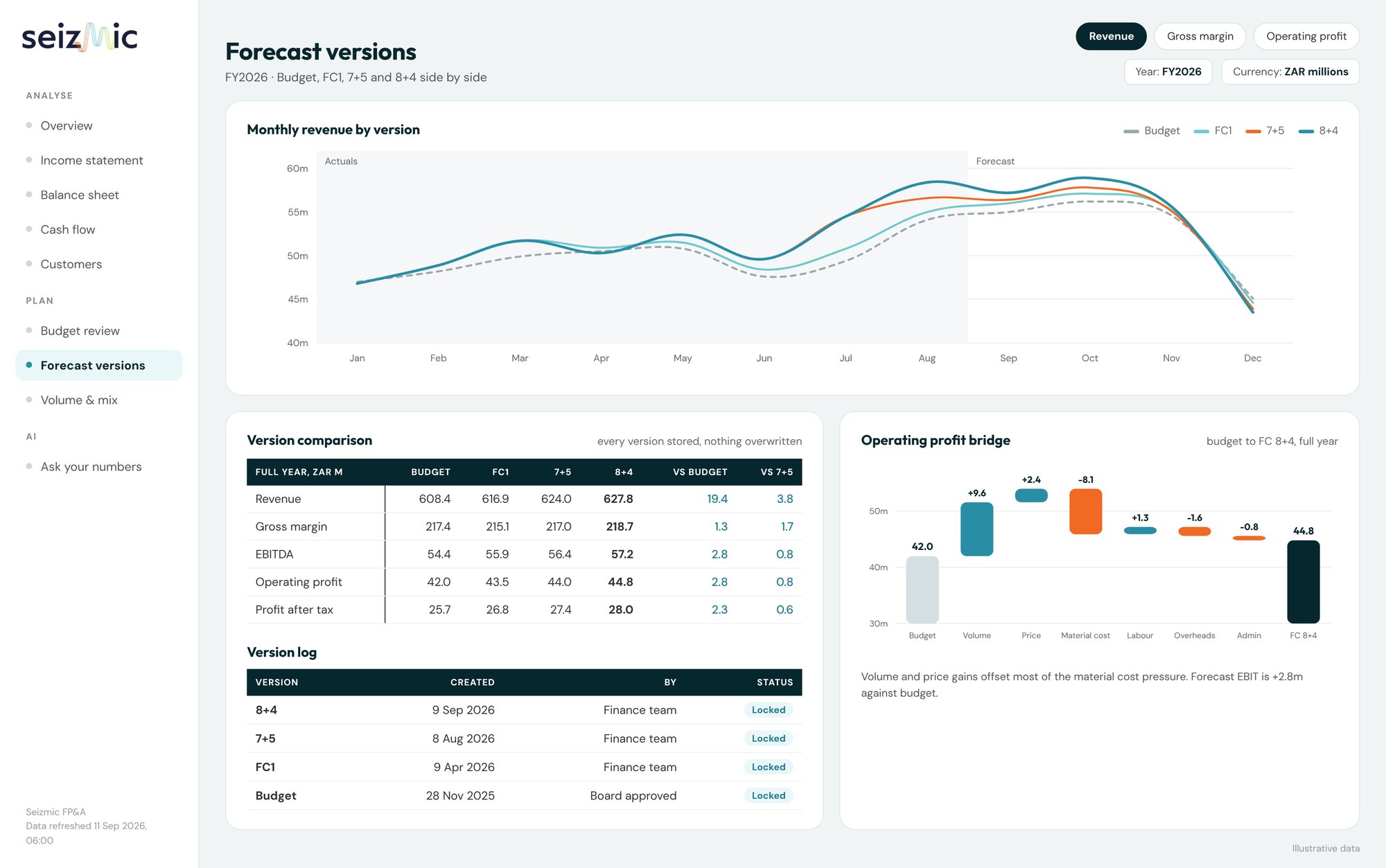
Lock in actuals, update the remaining months and keep every forecast version, side by side.
03
Variance analysis
Variances already split into volume, price, mix and rate, with commentary drafted for review.
04
Management reporting
Month-end and board packs that build themselves when the ledger closes.
05
Financial modeling and scenario planning
Ask the question in Claude or Copilot and get the scenario, worked from your governed forecast.
06
Strategic and long-range planning
Multi-year plans that start from the same model as the budget and the actuals.
07
Decision support
Profitability and business cases built on governed numbers, not exported spreadsheets.
08
Performance management
KPIs and operational drivers tracked in the same model as the money.
09
Cash flow and working capital planning
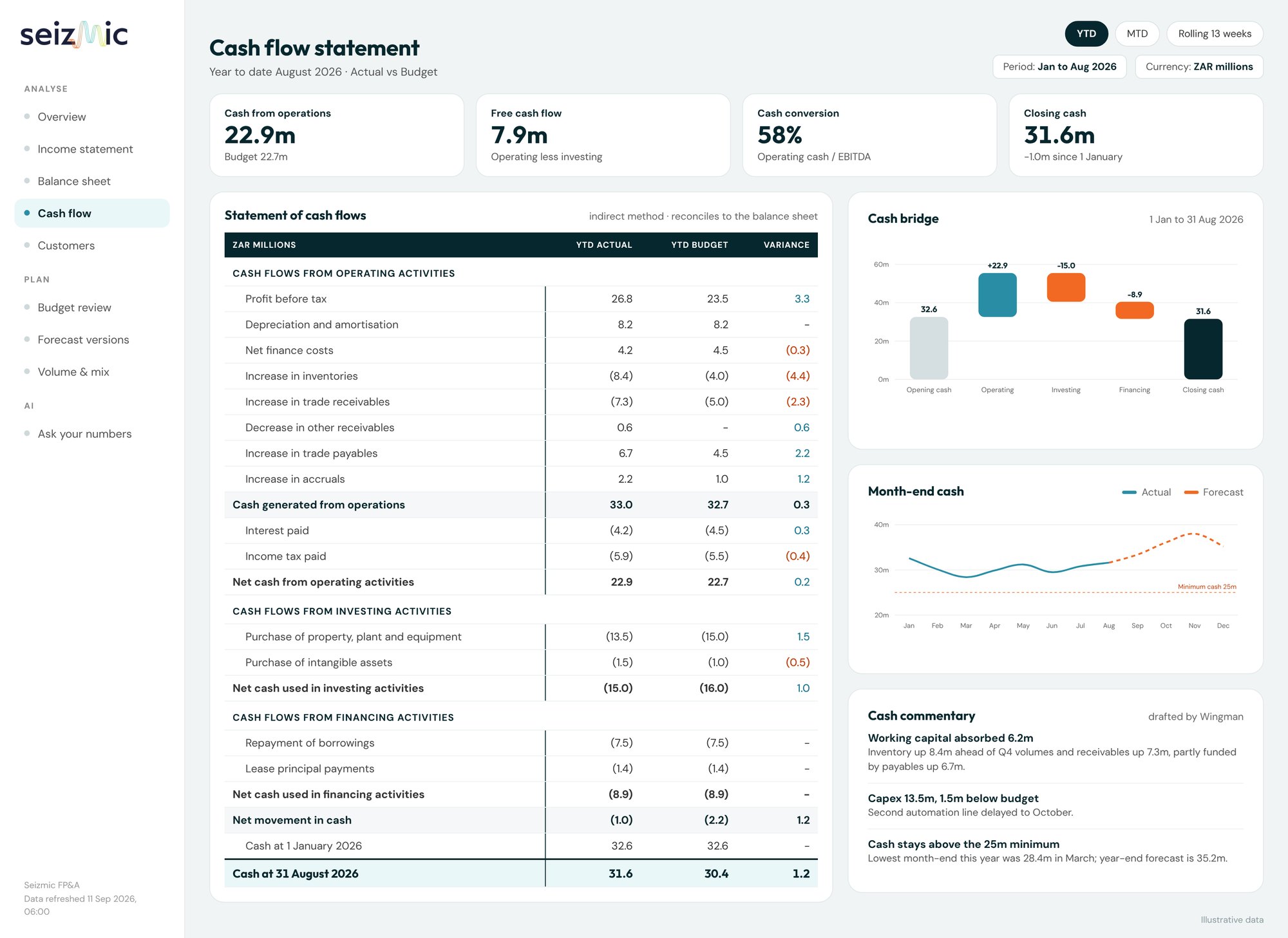
A cash view that always ties to the income statement and balance sheet.
10
Business partnering
Less time assembling numbers, more time in the conversation.
The center of your FP&A practice
Every FP&A tool your team uses, working from one model
Financial planning and analysis is more than a budget once a year. It is a monthly rhythm of closing, reporting, explaining, reforecasting and advising the business. Seizmic sits at the center of that rhythm: it takes in the ledger and the plans, holds them in one governed finance model, and serves every report, workbook and AI answer from it.
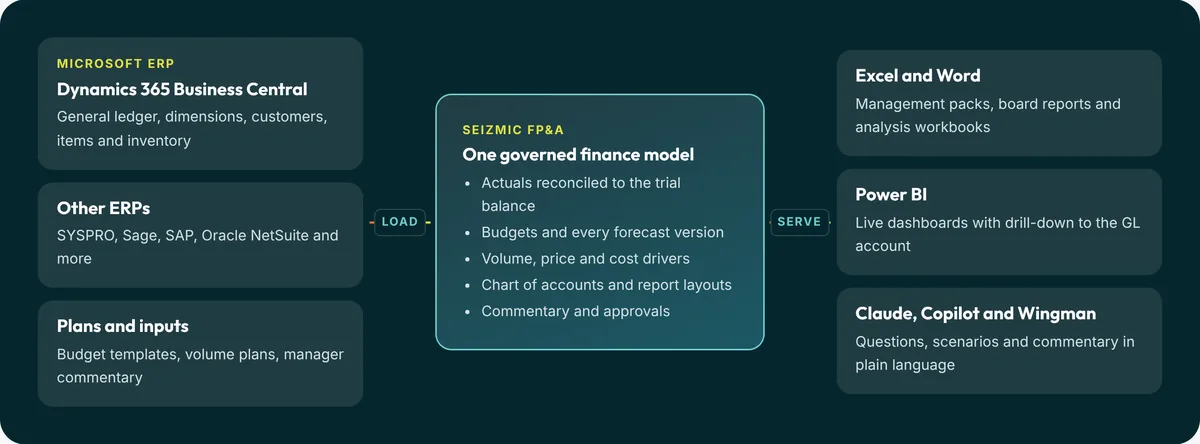
One version of the truth
The budget, the board pack and the AI answer read the same numbers, so meetings are about decisions, not about whose spreadsheet is right.
Tools your team already knows
No new interface to learn for most users. Excel, Word, Power BI, Teams and Claude stay the front end; Seizmic becomes the engine behind them.
Owned by finance
Report layouts, mappings and forecast versions are finance decisions, held in the model, not buried in formulas only one analyst understands.
The FP&A cycle
Seizmic supports every stage of the cycle
The best FP&A teams run a continuous loop: close the books, explain the result, update the outlook, plan ahead and test the options. Here is what each stage looks like with Seizmic at the center.
1
Close and consolidate
Actuals arrive from the ledger, mapped to a group chart of accounts across companies and divisions.
Daily loads from Business Central or your ERP, reconciled to the trial balance automatically.
2
Report and explain
Management statements against budget, forecast and prior year, with the story behind every material variance.
Packs ready when the ledger closes; variances split into volume, price, mix and rate.
3
Reforecast
Lock in actuals, update the remaining months and see how the year will land.
Rolling versions such as 3+9, 7+5 and 8+4, each stored and comparable side by side.
4
Plan and budget
Build next year from drivers: customers, items, volumes, prices and cost centers.
Manager inputs collected with commentary, rated for quality and approved in one place.
5
Model scenarios
Test what happens if volumes drop, material costs rise or a customer program slips.
What-if, sensitivity and goal seek through Claude or Copilot, on governed figures.
6
Decide and communicate
Give the exco and board a clear view of performance, risks and options.
Board reports in Word, detail in Excel, live in Power BI, all from the same model.
The FP&A toolkit today
A patchwork of exports and spreadsheets
ERP reports exported to Excel every month and pasted into linked workbooks
Budgets collected by email, with several versions of the truth in circulation
Material and labor costs reconciled by hand against the ledger
Commentary chased in emails and retyped into the board pack
Every "what if" means a new copy of the forecast workbook
AI tools fed with pasted figures nobody can trace
With Seizmic at the center
One model, every tool connected
Actuals load automatically and reconcile to the trial balance
One budget, with every forecast version stored and comparable
Item costs and margins compared with plan
Commentary captured against the line it explains
Scenarios run from the governed forecast in minutes
Claude and Copilot answer from the same numbers as the board pack
For the whole finance team
Less time assembling numbers, more time advising the business
CFO
A trusted view, sooner
One set of numbers for the board, a forecast you can defend, and scenarios on request.
FP&A manager
Shorter cycles
Budget and reforecast without chasing spreadsheets, consolidating versions or rebuilding the pack.
Financial analyst
Analysis, not admin
Variances already split and drillable, so time goes into explaining why the numbers moved.
Cost accountant
Cost and margin detail
Material, labor and overhead by location, customer and item, straight from Business Central.
AI connectors · MCP
Your finance model, inside Claude and Microsoft Copilot
Seizmic includes an MCP connector, the open standard AI assistants use to reach business data. Your team asks Claude or Copilot about actuals, budgets and forecasts, and the answer comes straight from your governed Seizmic model.
Live figures from your ledger, not pasted spreadsheets
Board commentary and variance explanations drafted in seconds
Scenario planning, what-if and goal seek questions answered from your real cost structure
Signed in with Microsoft, read-only, same permissions as your reports
Claude
by Anthropic. Ask, analyze and draft board packs from live Seizmic data.
Copilot
by Microsoft. The Seizmic Copilot agent in Teams and Microsoft 365.
One connector, any MCP assistant
Model Context Protocol: the open standard supported by Anthropic and Microsoft.
Plan
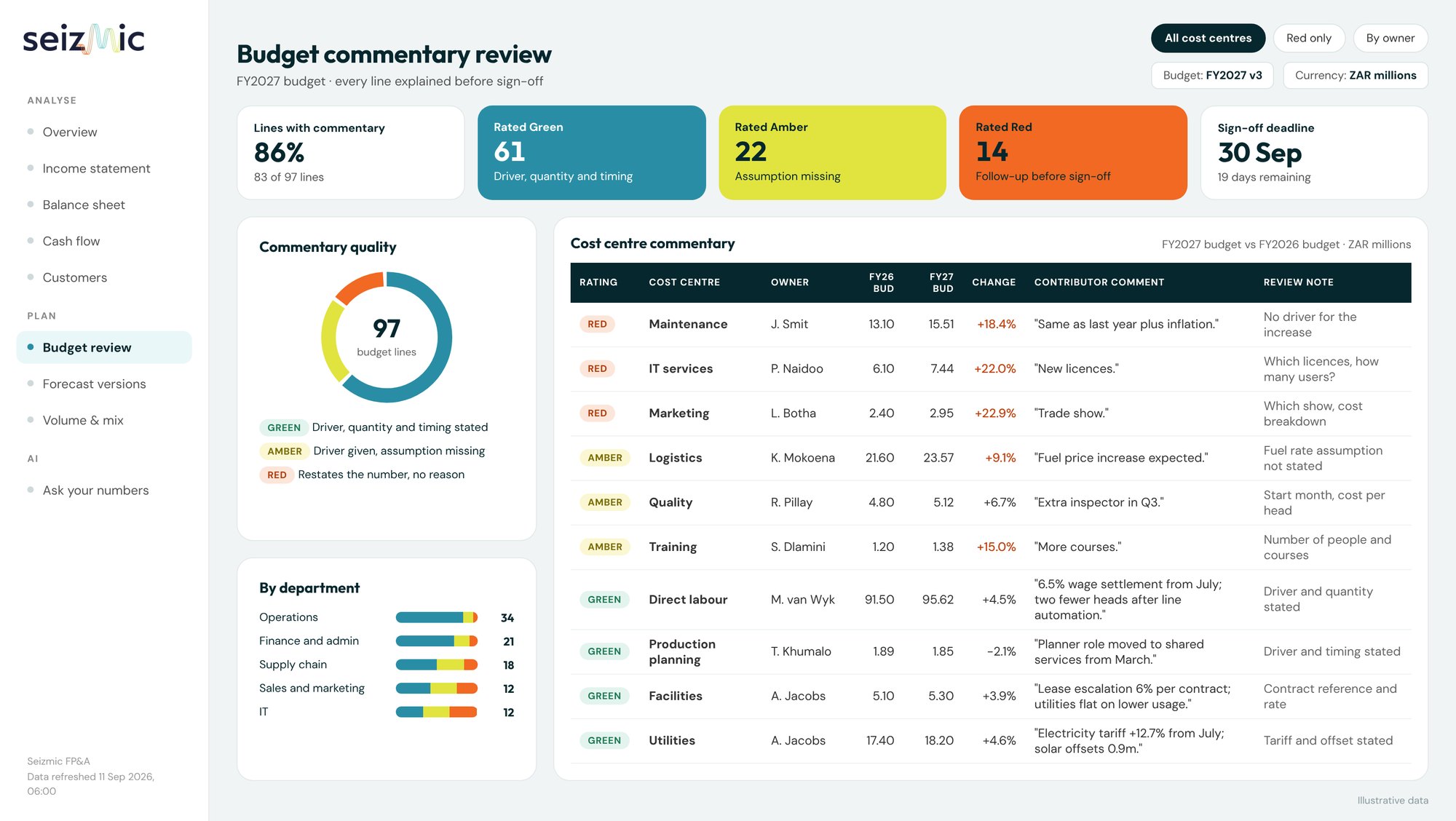
A budget your managers can explain
Every budget line carries the contributor's commentary, and Seizmic rates that commentary so finance knows which lines need a conversation before sign-off.
Budget by GL, cost center, customer or product
Forecast versions side by side (FC1, 7+5, 8+4)
Volume, price and mix planning per customer program
Prior year budget, actuals and forecast in one view
Report
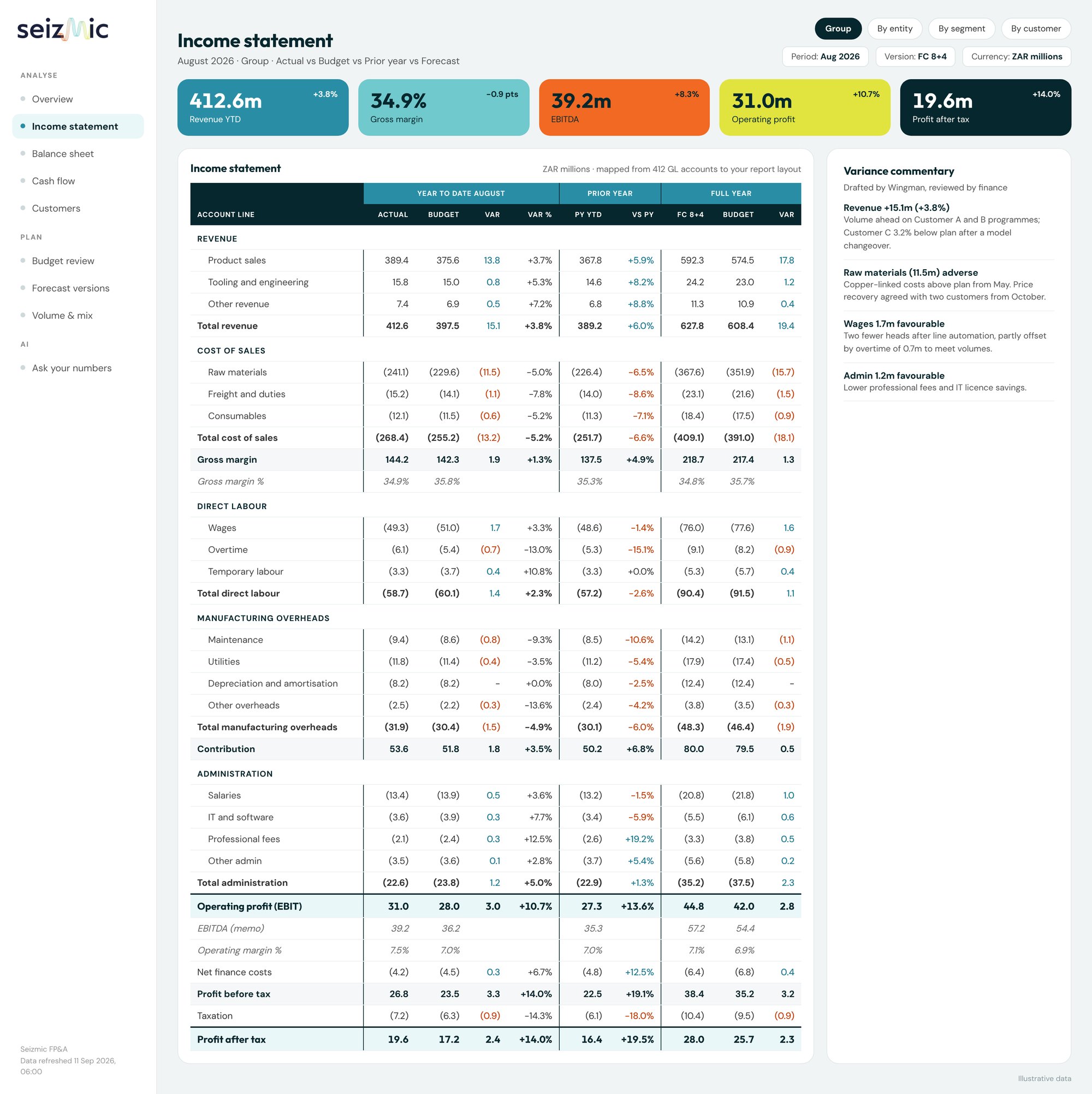
Month-end packs, ready when the ledger closes
Your report layouts are configured once, mapped to your chart of accounts, and refreshed every day. No copy and paste, no broken links between spreadsheets.
Income statement in your own format and line order
Statements by entity, segment or customer
Actual vs budget vs forecast vs prior year
Board pack in Word, detailed pack in Excel, live view in Power BI
Product tour
Every report your board expects, from one model
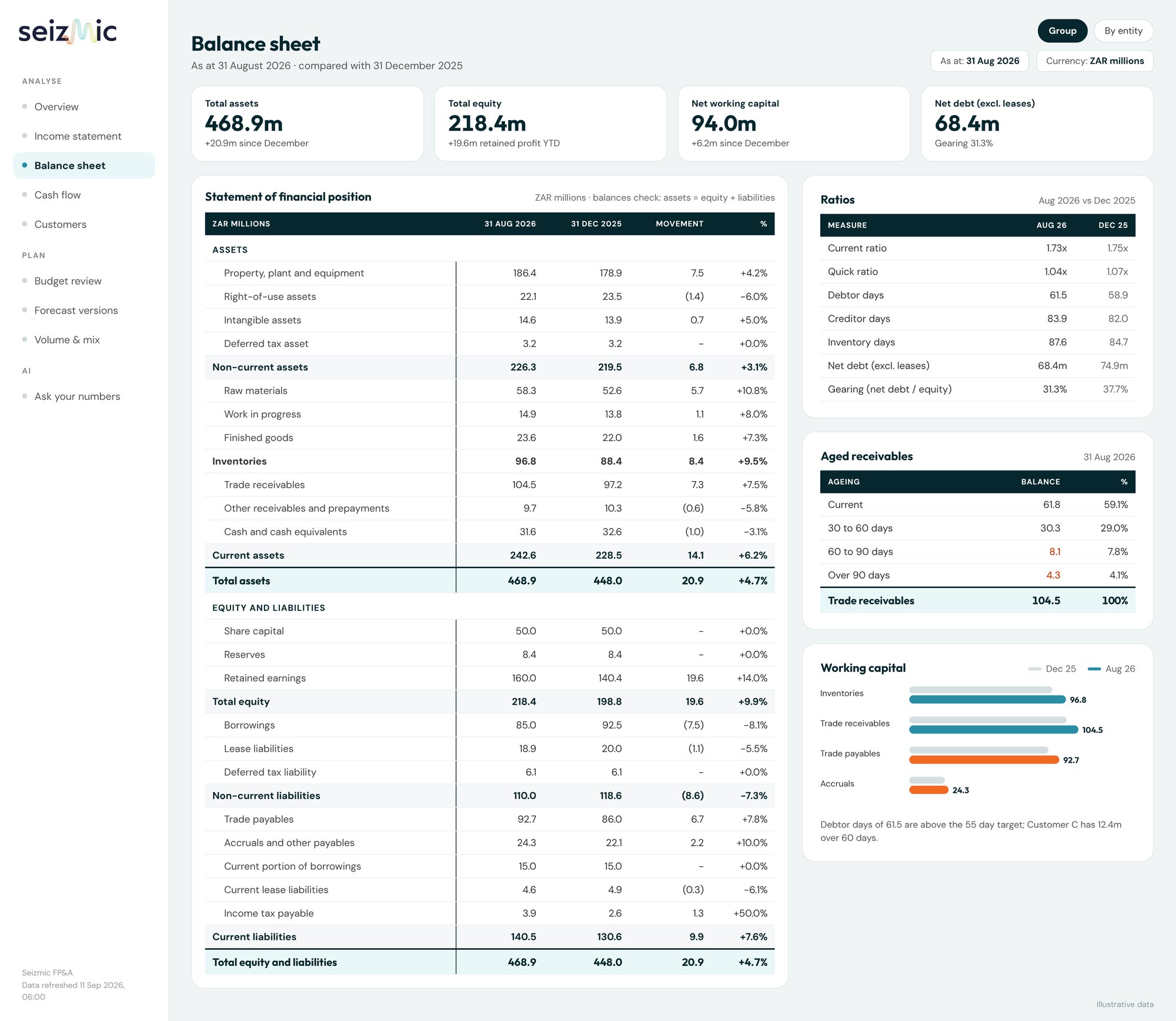
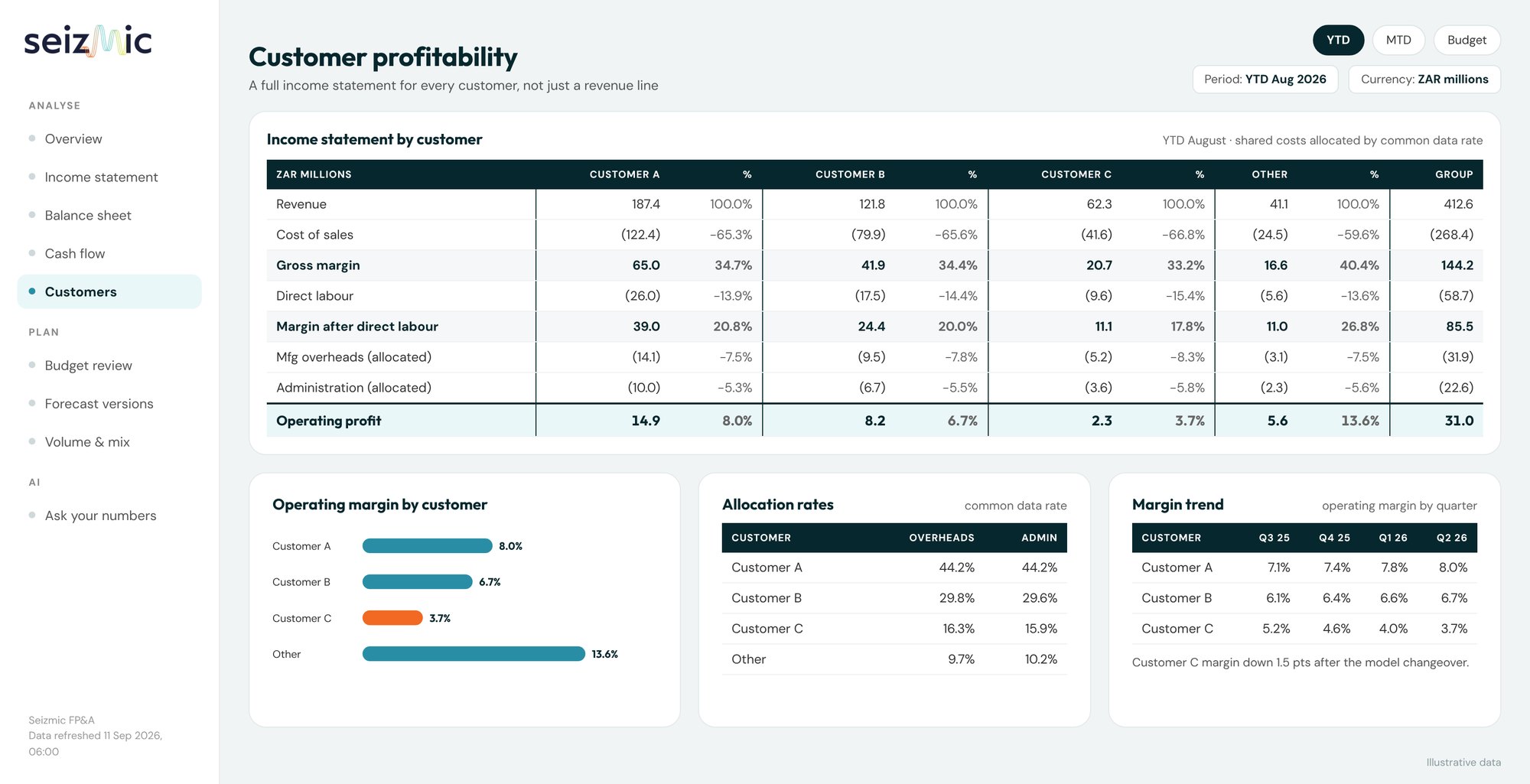
Dashboards, full financial statements, forecasts and customer profitability, all reading the same governed numbers. Click any screen to open it full size.
Group performance at a glance
Revenue, margin, EBITDA, profit, cash and net debt against budget, with exceptions flagged automatically every month.
Actual vs budget vs latest forecast
Auto-flagged exceptions
Drill from any tile to the detail
Delivered in Excel too
Finance teams still live in Excel. Seizmic gives them better workbooks.
Every pack is produced as a formatted workbook: your report layout, grouped and bordered sections, formulas intact, and a cover and notes sheet. No copying from Power BI, no broken links.
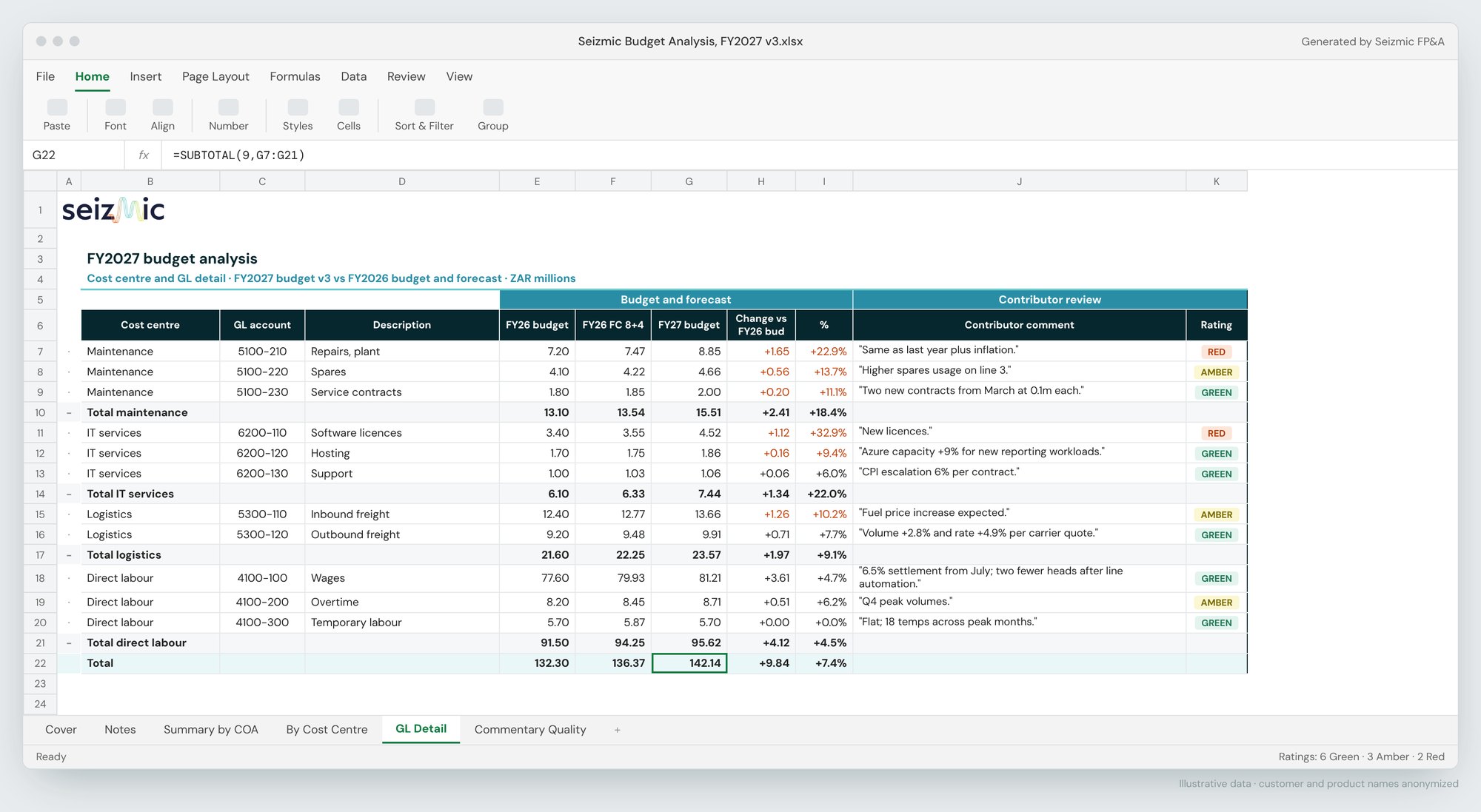
Budget analysis. Cost center and GL detail with contributor commentary and Red, Amber, Green ratings.
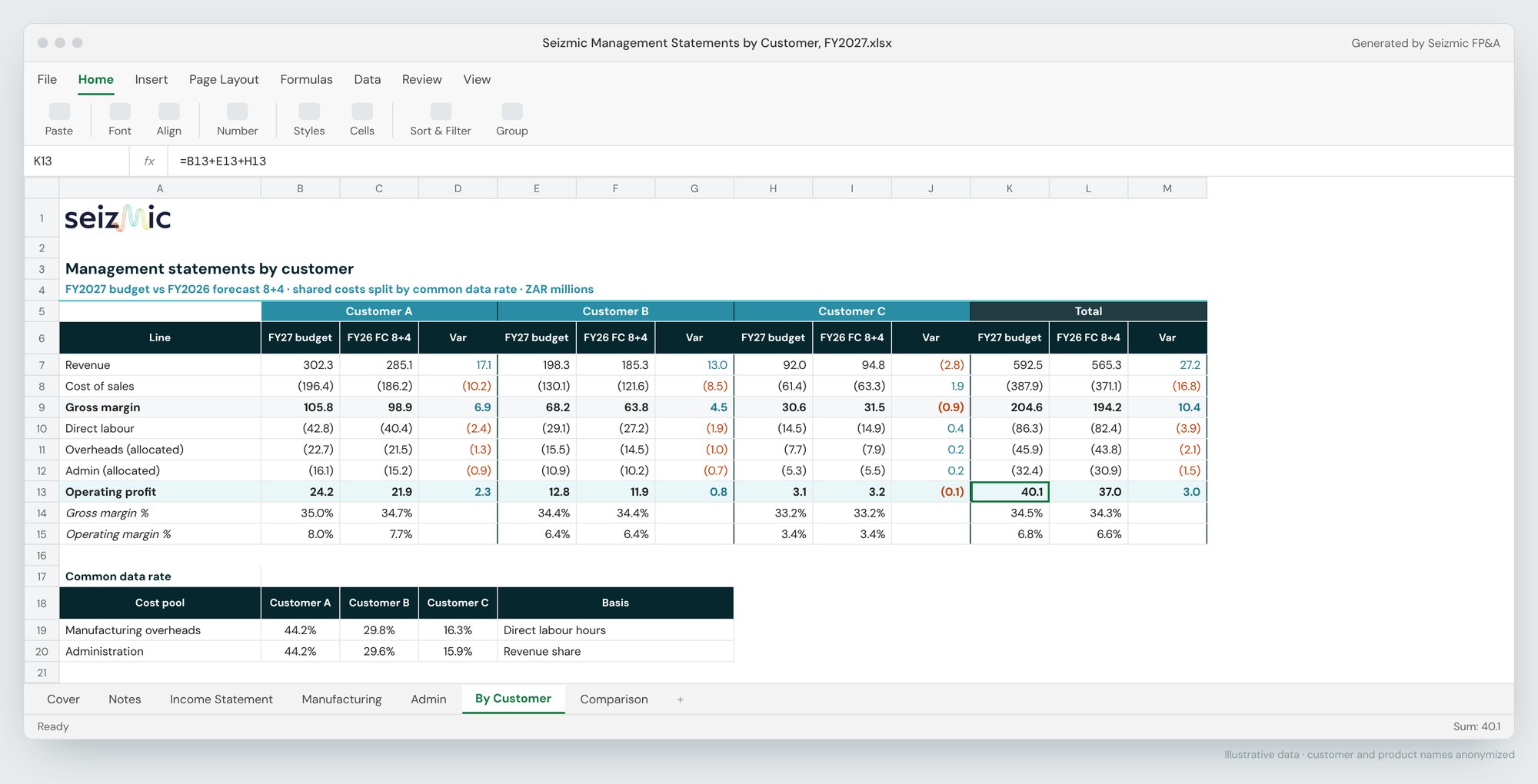
Statements by customer. Budget vs forecast for each customer, shared costs split by common data rate.
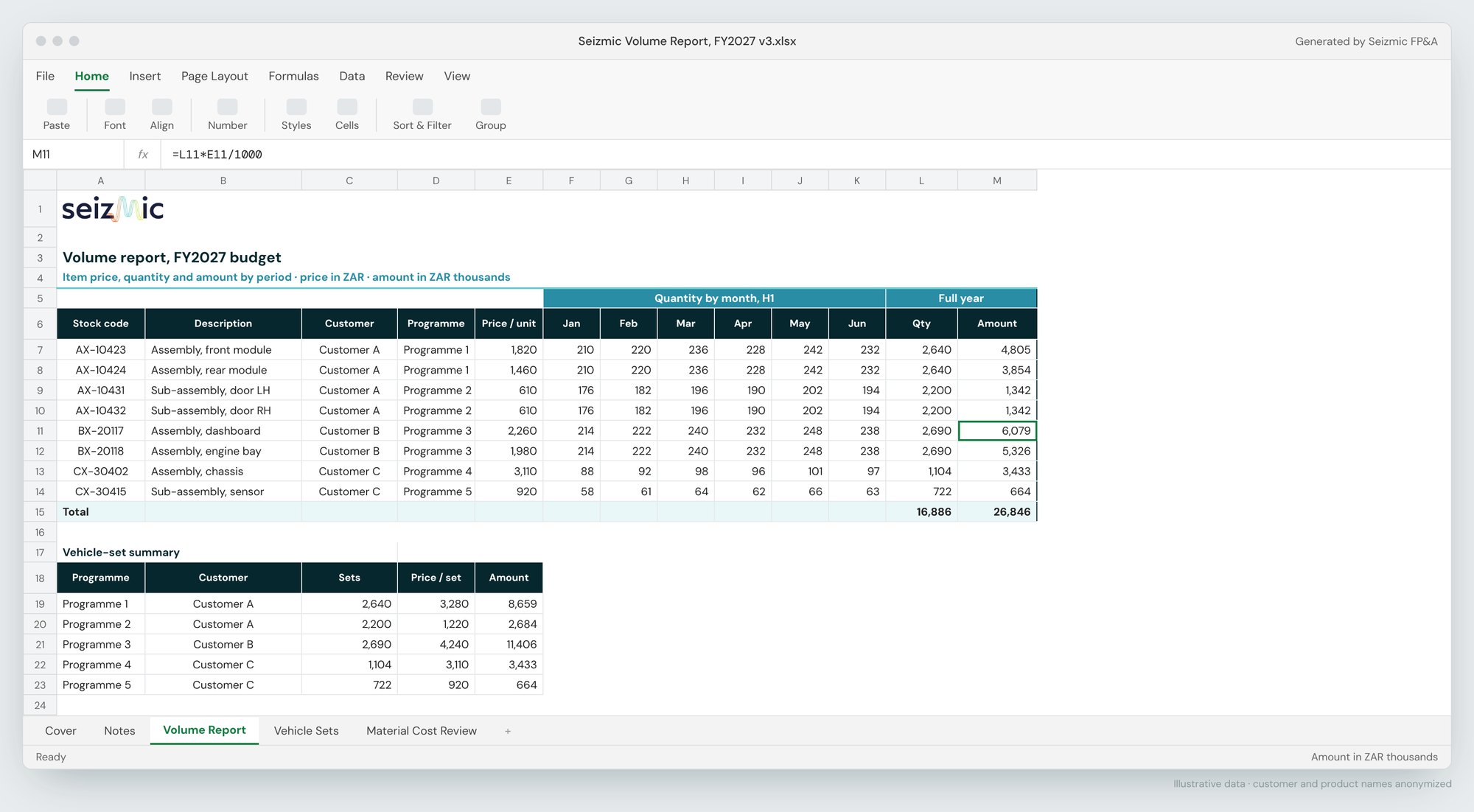
Volume report. Price, quantity and amount by item and month, with a program summary.
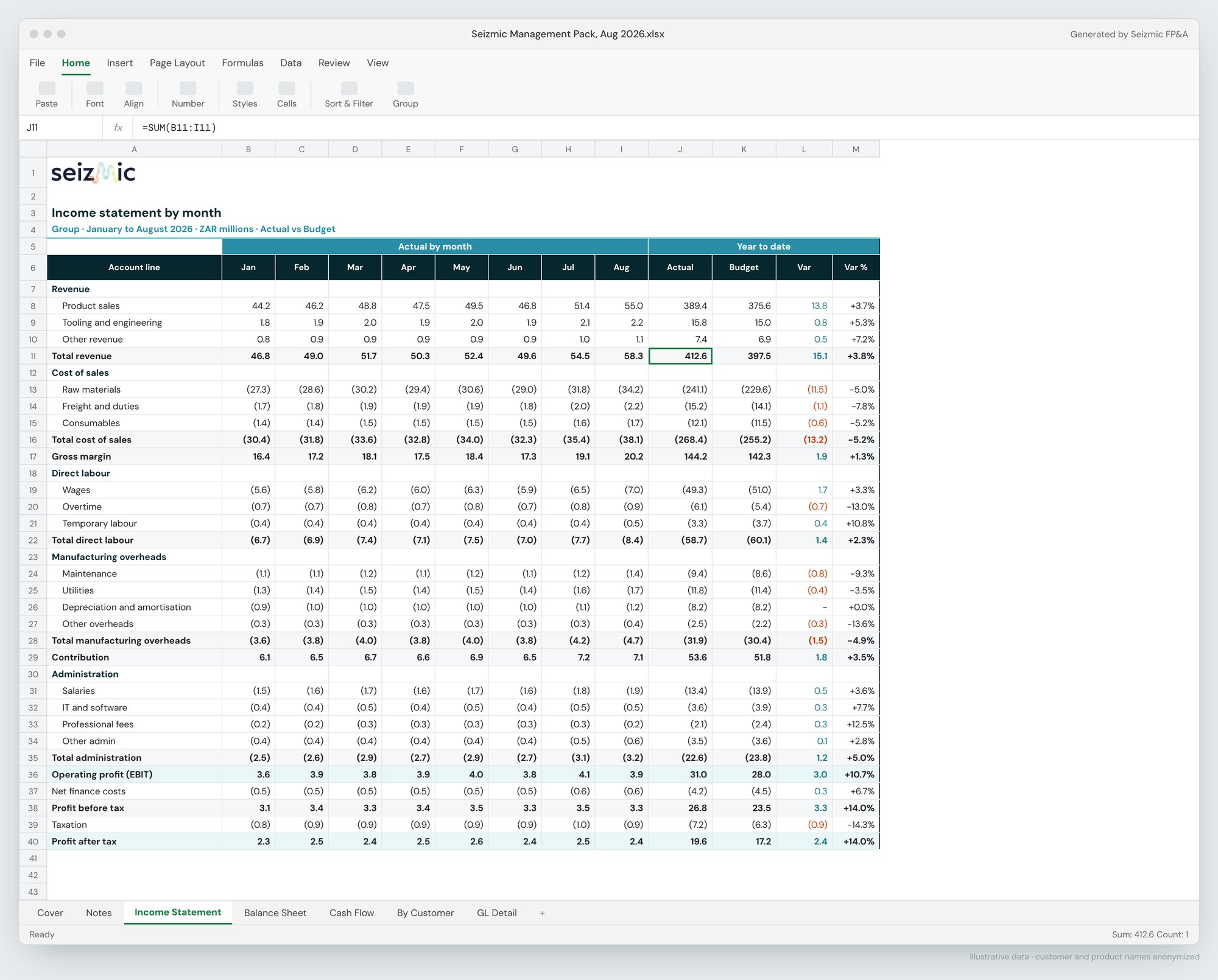
Management pack. Income statement by month with year-to-date actual vs budget.
How it works
From ledger to board pack, in four steps
Seizmic runs on Microsoft Fabric. We load your actuals automatically, model them into a standard finance structure, and every report, forecast and AI answer reads from that one model.
1 · Connect
Your source systems
Dynamics 365 Business Central, SYSPRO, Sage, SAP, NetSuite and other ERPs
Budget and volume templates
Read only; nothing written back
2 · Store
Microsoft Fabric warehouse
Bronze, Silver and Gold layers
Automated daily loads
Full load history for audit
3 · Model
The Seizmic finance model
Actuals, budgets and forecast versions
Chart of accounts and report layouts
Volume, price and mix by customer
4 · Use
Reports and answers
Power BI dashboards
Excel and Word board packs
Claude and Copilot via MCP
Wingman, built in
Business Central and Seizmic
Dynamics 365 Business Central
Built for finance teams running Business Central
Microsoft Dynamics 365 Business Central is the ERP of choice for growing mid-market businesses, and it sits naturally alongside Microsoft Fabric, Power BI and Microsoft 365. Seizmic connects directly to it, so the detail Business Central holds on dimensions, customers, items and companies flows into your budgets, forecasts and management statements, not just the general ledger totals.
Statements by company, dimension, customer and item
Business Central dimensions mapped to your cost centers, departments and projects
Volume and price budgets by item and customer
Margin by customer and product, with shared costs allocated
Consolidation across multiple Business Central companies
What Seizmic loads from Business Central
Read-only connection through the Business Central APIs into Microsoft Fabric, refreshed daily
General ledger
G/L entries and balances by company, with global and shortcut dimensions
Sales
Invoiced sales by customer and item
Inventory
Item ledger and value entries by location
Budgets
G/L budgets as a starting point for the new plan
Customers and vendors
Ledger entries for debtor and creditor days
Purchasing
Purchase prices and item costs for margin review
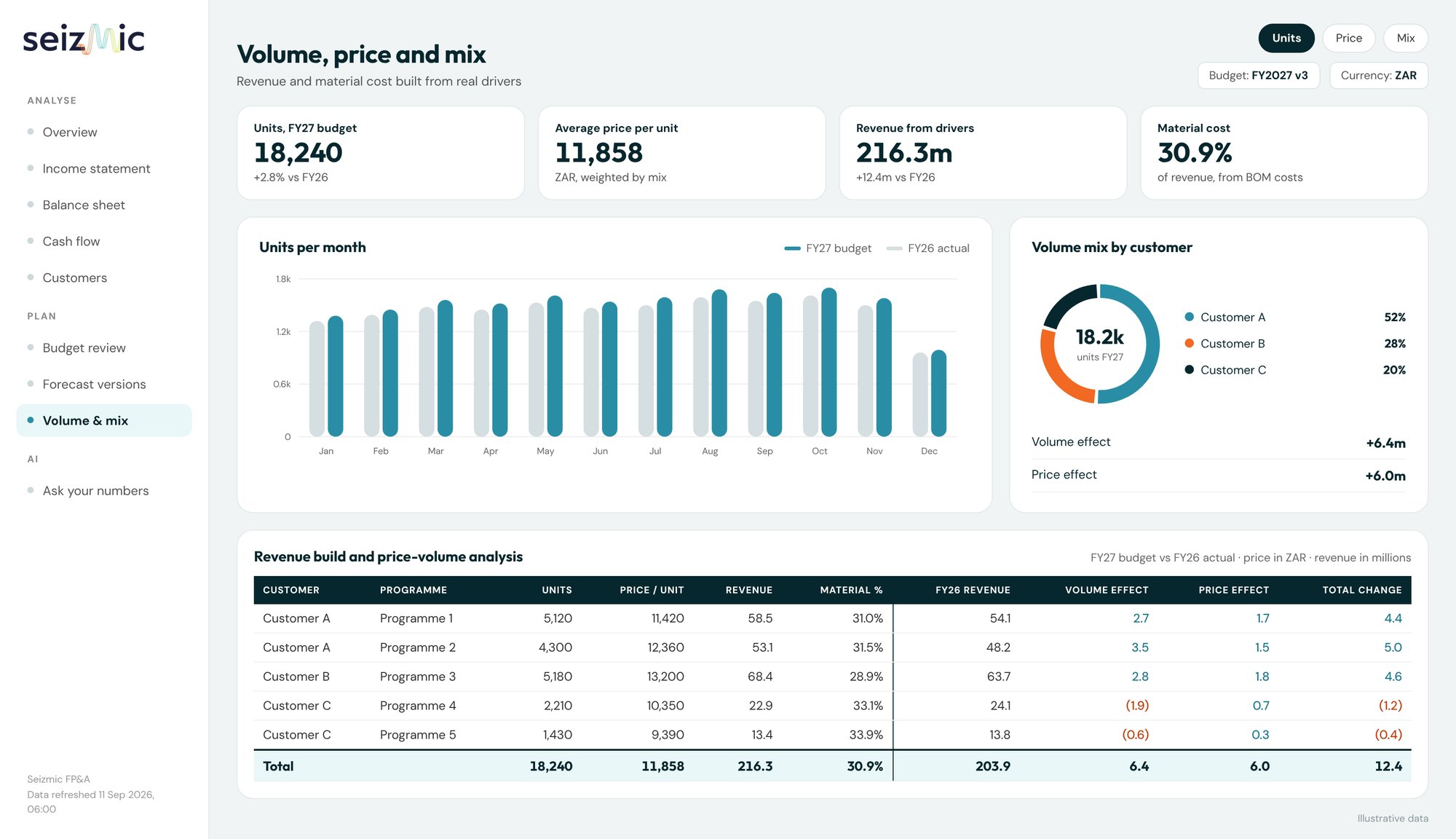
Volume, price and mix. Revenue and cost built from Business Central items and customers.
Who it is for
Built for mid-market finance teams with real complexity
Multiple entities, customers with their own programs, seasonal volumes, or a board that wants commentary on every variance.
Manufacturing
Industrial manufacturing
Budget by OEM program, material cost tracking and manufacturing statements, connected directly to Business Central.
Food & agri
FMCG and commodity export
Seasonal volumes, producer reporting, group consolidation across trading entities.
Financial services
Lenders and investors
Approvals, disbursements and contribution against budget by region.
Multi-entity groups
Holding companies
One chart of accounts across entities, consolidated and by segment.
3 days
“Implementing Seizmic eliminated the error-prone Excel process that we ran every month.”
Month-end close cut from 12 working days to 3, including the internal financial processing and journals, after a manual Excel process was replaced with Seizmic.
Head of FP&A, Major Manufacturing Company
Implementation
Live in 6 to 8 weeks, reconciled to your trial balance
Weeks 1 to 2
Discover and connect
Map your chart of accounts and report layouts. Connect your ERP.
Weeks 3 to 4
Build the model
Load history, reconcile to your trial balance, configure report templates.
Weeks 5 to 6
First reports
Month-end pack and budget vs actual, signed off by your finance team.
Weeks 7 to 8
Plan and go live
Budget and forecast cycle, Wingman enabled, training and handover.
Questions
Things finance leaders ask us first
Do we need to replace our ERP?
No. Seizmic reads from your ERP and leaves it unchanged. We support Microsoft Dynamics 365 Business Central, SYSPRO, Sage, SAP and Oracle NetSuite as standard, connect to other ERPs on request, and load budget inputs from Excel templates where needed.
We run Business Central. How deep does the connection go?
Beyond the general ledger. Seizmic loads G/L entries with their dimensions, sales by customer and item, inventory, budgets and customer and vendor ledger entries from Business Central, so statements, budgets and margin analysis work at dimension, customer and item level. See Business Central integration.
Where does our data live?
In a Microsoft Fabric data warehouse on Azure, hosted either in Seizmic's tenant or in your own Microsoft tenant. When Seizmic hosts it, your data is stored in a region within the United States.
How much does it cost?
You start with a $7,500 fixed-fee pilot, credited in full to your subscription when you move to a full implementation. The Core plan starts at $35,000 per year for up to 5 entities on one ERP, plus $375 per Report User and $495 per Planning User. See Pricing for what each plan includes.
Do we have to use Power BI?
Power BI gives you the live dashboards, but many finance teams mainly use the Excel and Word packs Seizmic produces. Both read from the same model, so the numbers match.
Can we use Seizmic from Claude or Microsoft Copilot?
Yes. Seizmic includes an MCP connector, so Claude and the Seizmic Copilot agent can query your finance model directly. Users sign in with Microsoft, access is read-only, and they see only the data they are permitted to see. How it works.
What does Wingman do with our data?
Wingman answers questions using your Seizmic model and only shows data the user is permitted to see. It is built on Microsoft technologies, and your data is not used to train AI models.
Who is behind Seizmic?
Seizmic is the FP&A product of TrueNorth Group, a data and AI consultancy working across South Africa and the United States, and a Microsoft and Anthropic partner. About Seizmic.
See Seizmic on finance data like yours
A 30 minute demo with someone who has built FP&A models, not a sales script.