


AI connectors · MCP
Your finance model, inside Claude and Microsoft Copilot
Seizmic ships with an MCP connector, so the AI assistants your team already uses can work directly with your governed actuals, budgets, forecasts and drivers. Go beyond "what was revenue?" to scenario planning, what-if analysis, goal seeking and forecast challenge, in plain language, with every figure traceable to your ledger.
Ask in Claude. The answer comes from Seizmic.
When someone asks a finance question, the assistant calls the Seizmic connector, which reads the model structure, writes the query, runs it against your data and returns the figures. The assistant then explains them, models scenarios on top of them, drafts commentary, or builds the table, chart or workbook you asked for.
Live figures from your Seizmic model, not training data or guesses
Scenarios and what-ifs built on your real cost structure and drivers
Board commentary, variance explanations and summaries drafted in seconds
Each user signs in with Microsoft and sees only what they are allowed to see
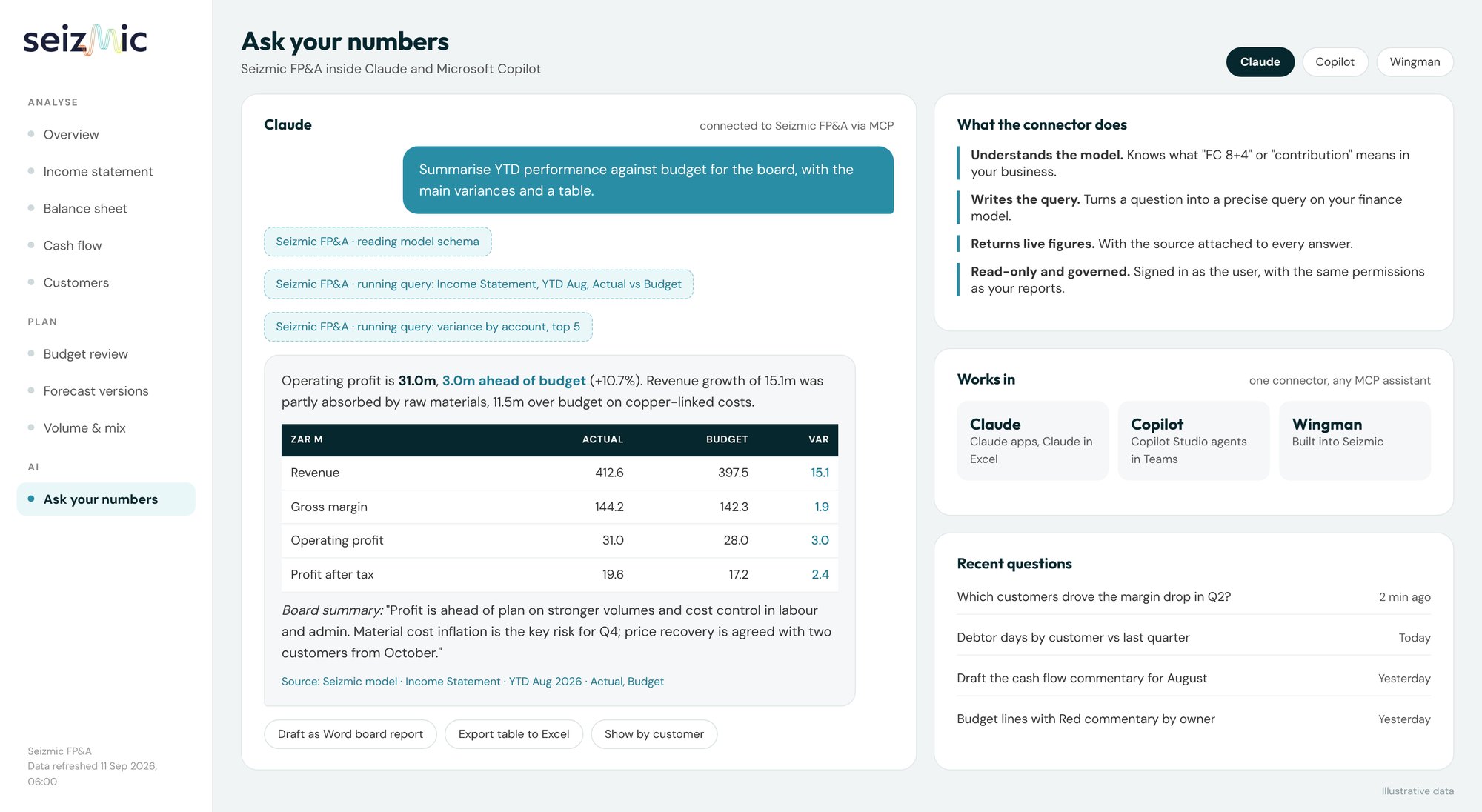
Illustrative data. Click a screen to open it full size.
Beyond lookups
From "what happened" to "what should we do"
Most AI demos stop at fetching a number. With your whole finance model behind it, the assistant can work through every level of question a finance team gets asked.
1 · Report
What happened?
Actuals, budget, forecast and prior year for any line, period, entity or customer.
What was gross margin by customer for Q2?
2 · Explain
Why did it happen?
Variances split into volume, price, mix and rate, drilled to cost center and GL account.
Why are raw materials over budget?
3 · Explore
What if?
Scenarios and sensitivities on volume, price, costs and timing, built from your drivers.
What if Customer A cuts volumes 15% from October?
4 · Decide
What do we need to do?
Goal seek, break-even and options compared, ready to take to the exco or board.
What price increase restores Customer C to a 5% margin?
What you can ask
Six kinds of question, answered from your model
Pick a tab to see a real-style conversation. Every figure in the answer is queried from Seizmic or calculated from those figures, with the workings shown.
Root cause, not just the gap
The assistant flexes the budget to actual volumes, separates volume from rate, and drills to the accounts and months where the movement happened.
Why are raw materials over budget year to date?
Split the revenue variance into volume, price and mix.
Which cost centers explain the overtime overspend, and since when?
Draft the variance commentary for the August board pack.
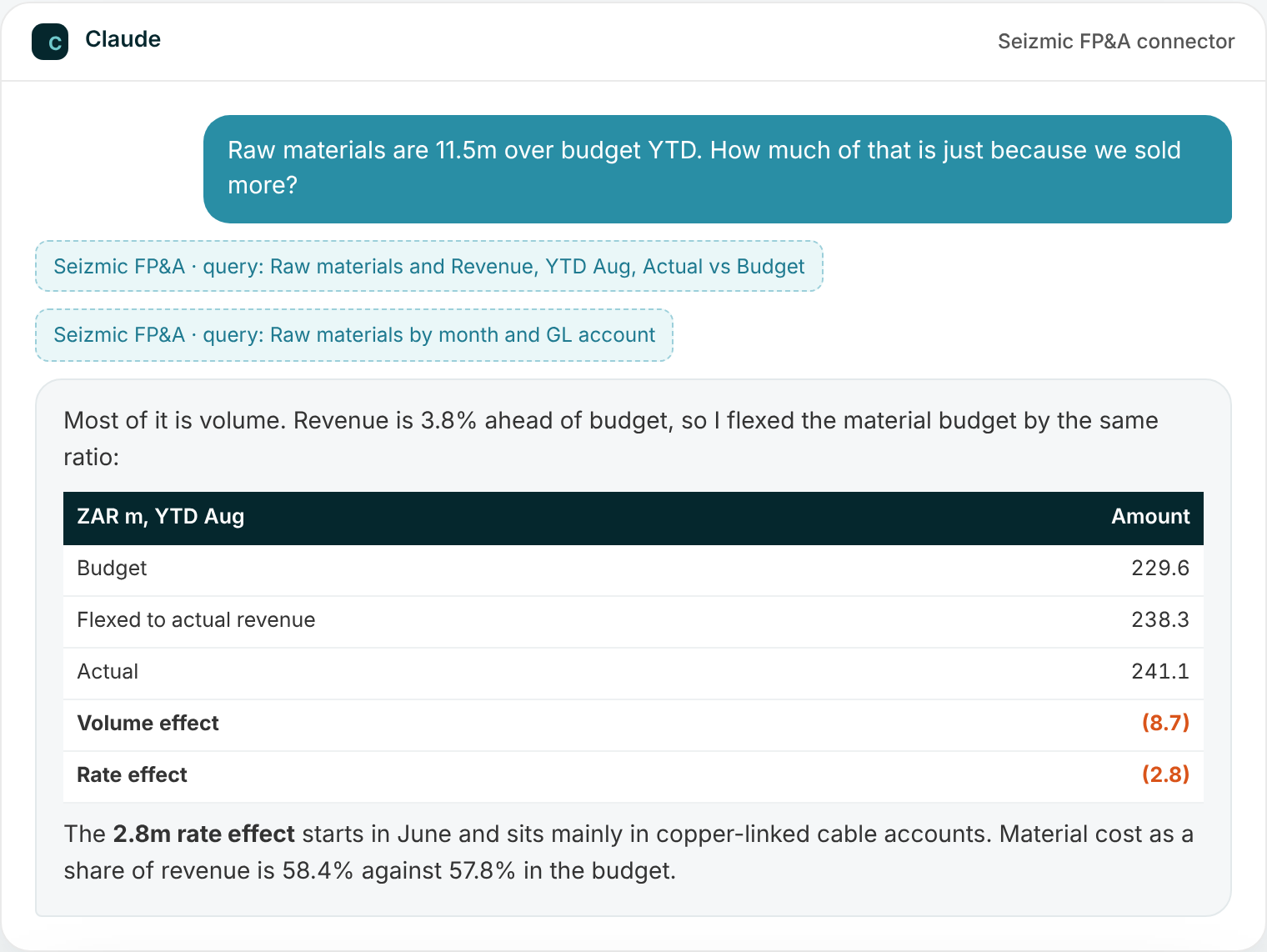
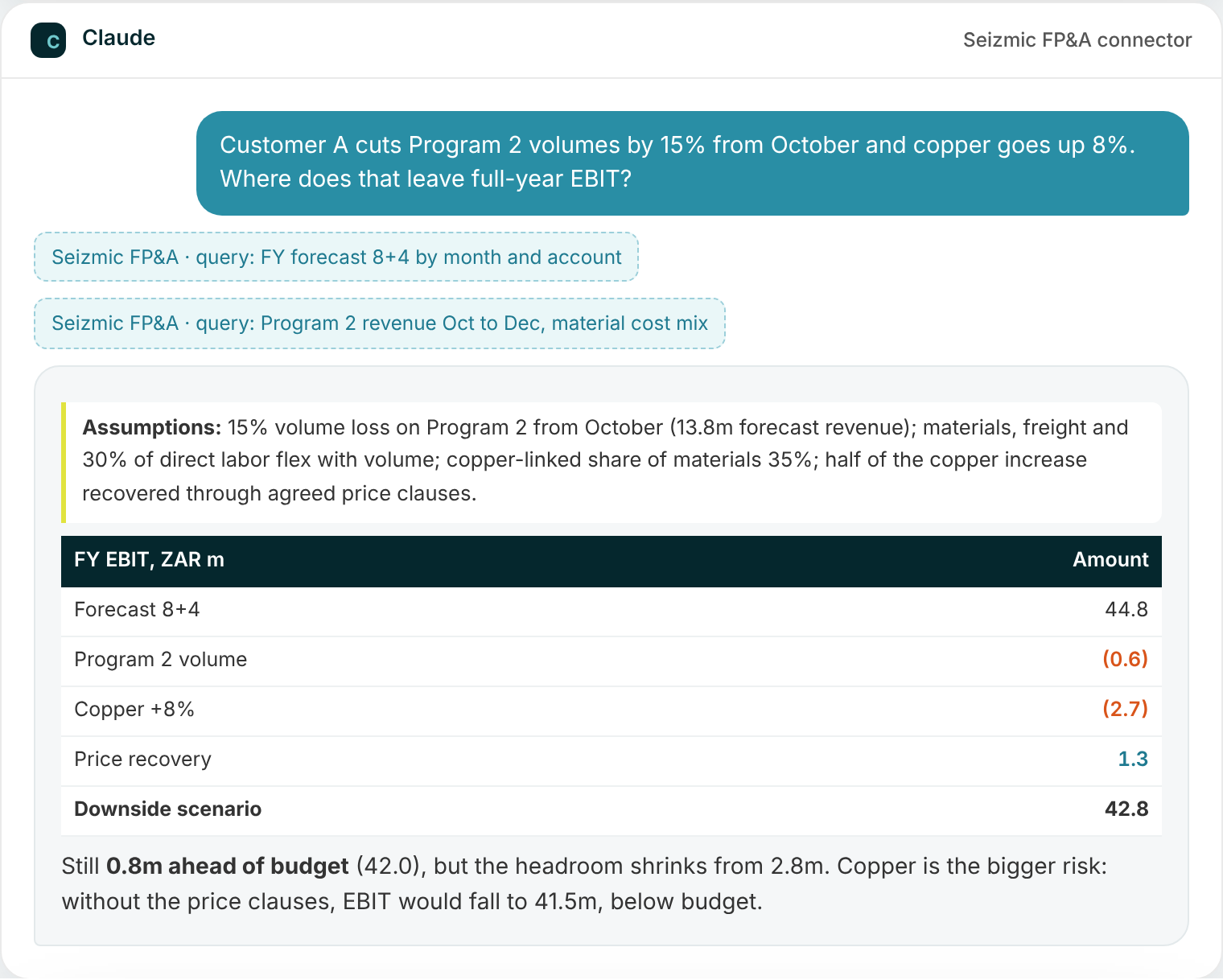
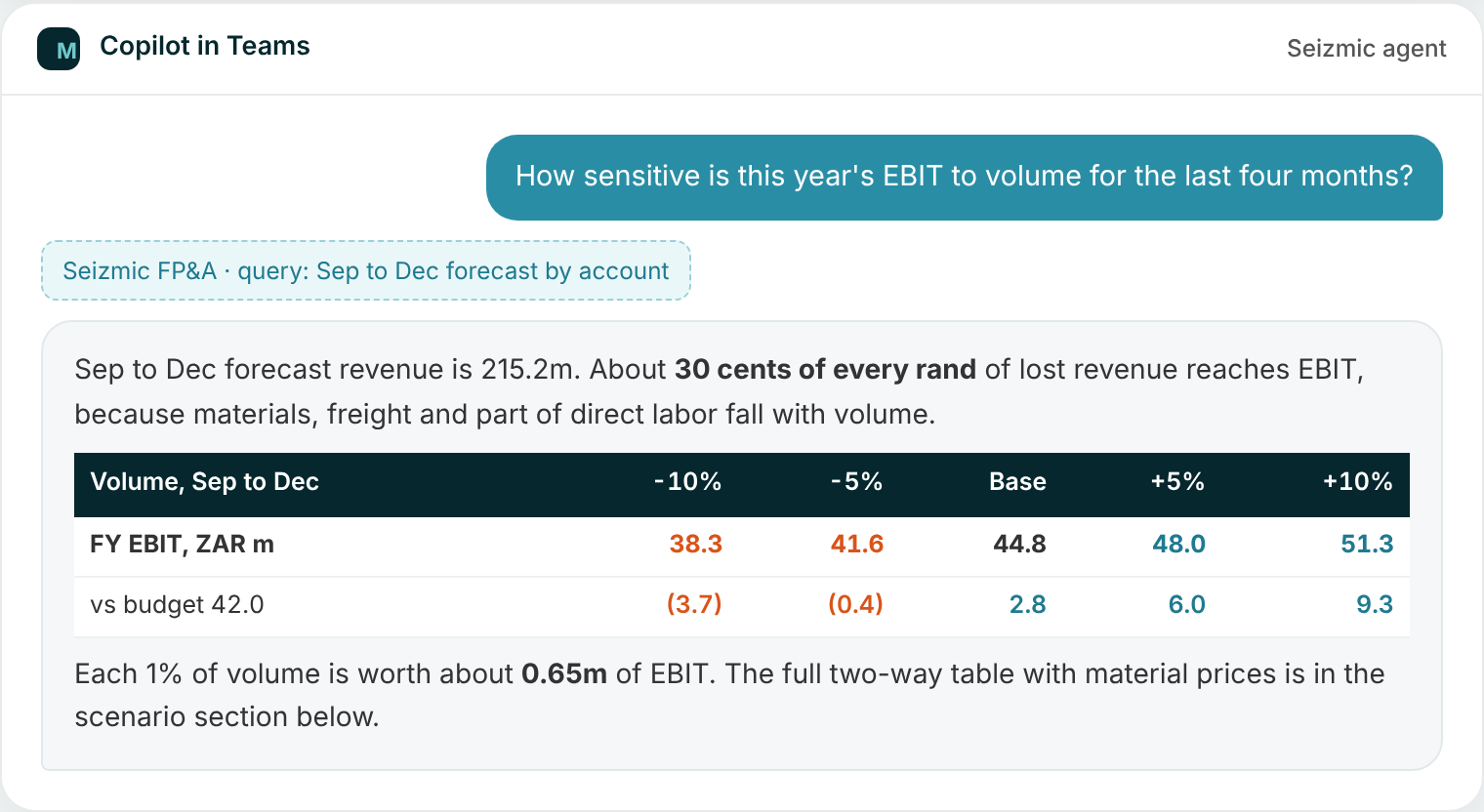
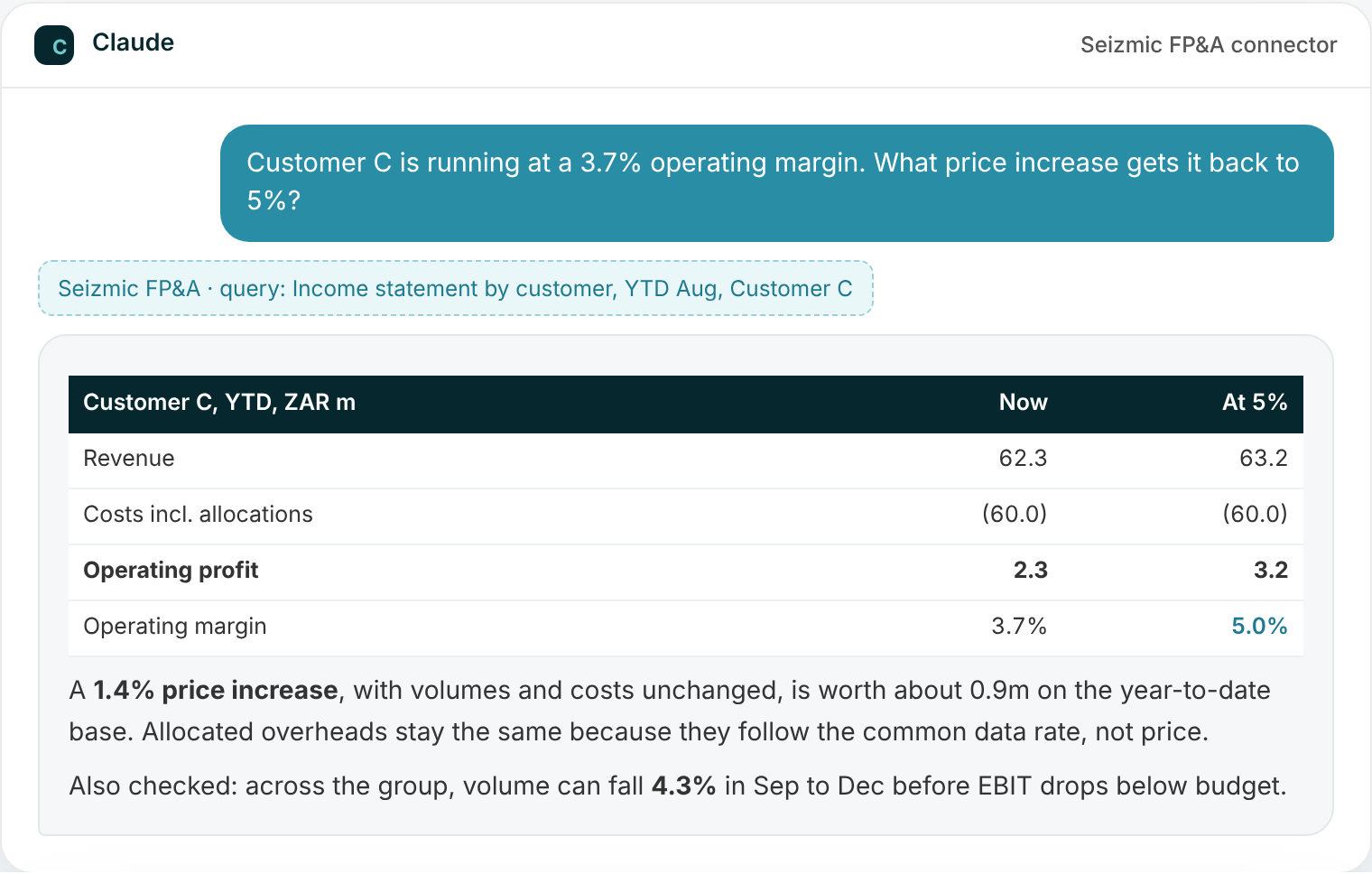
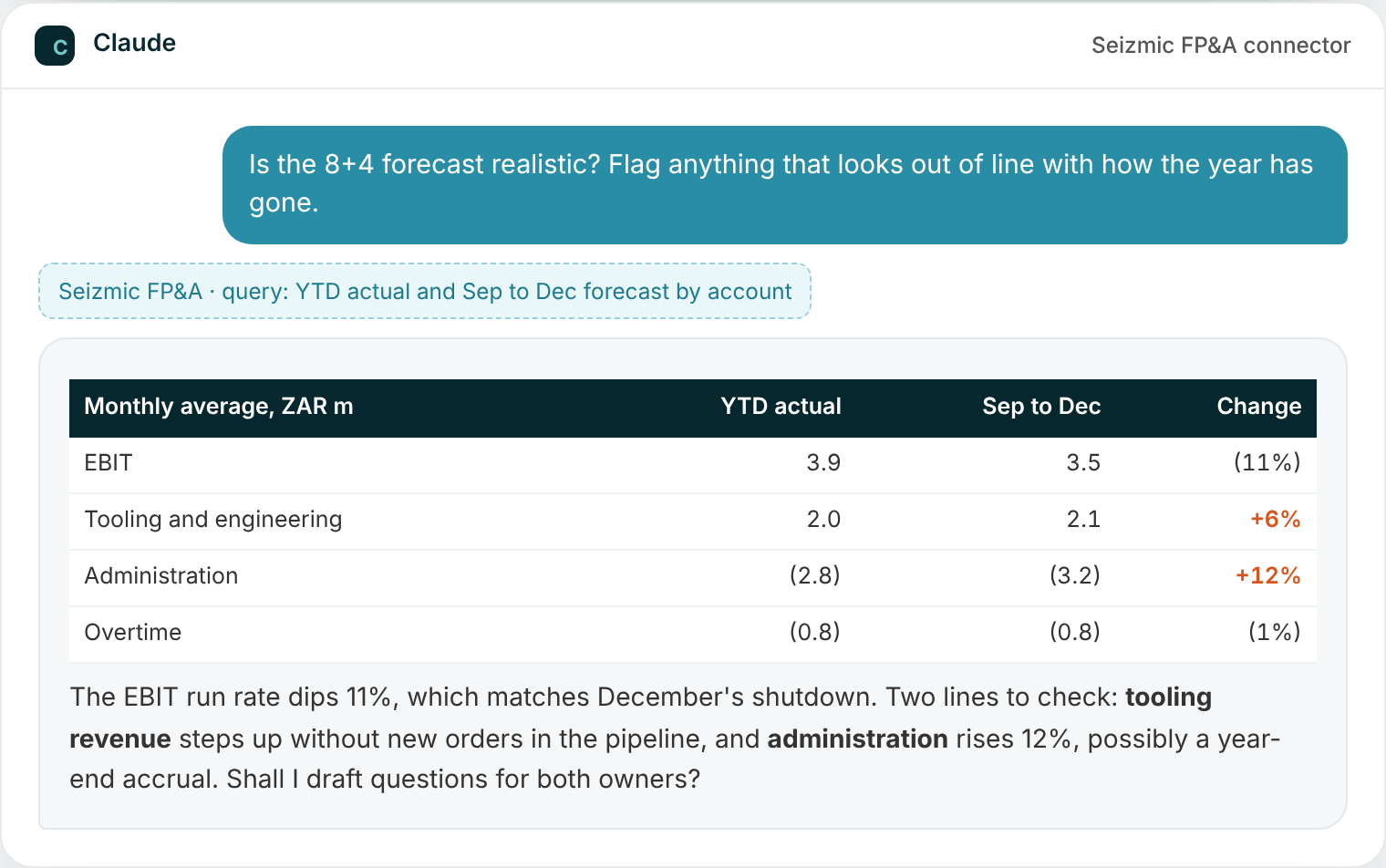
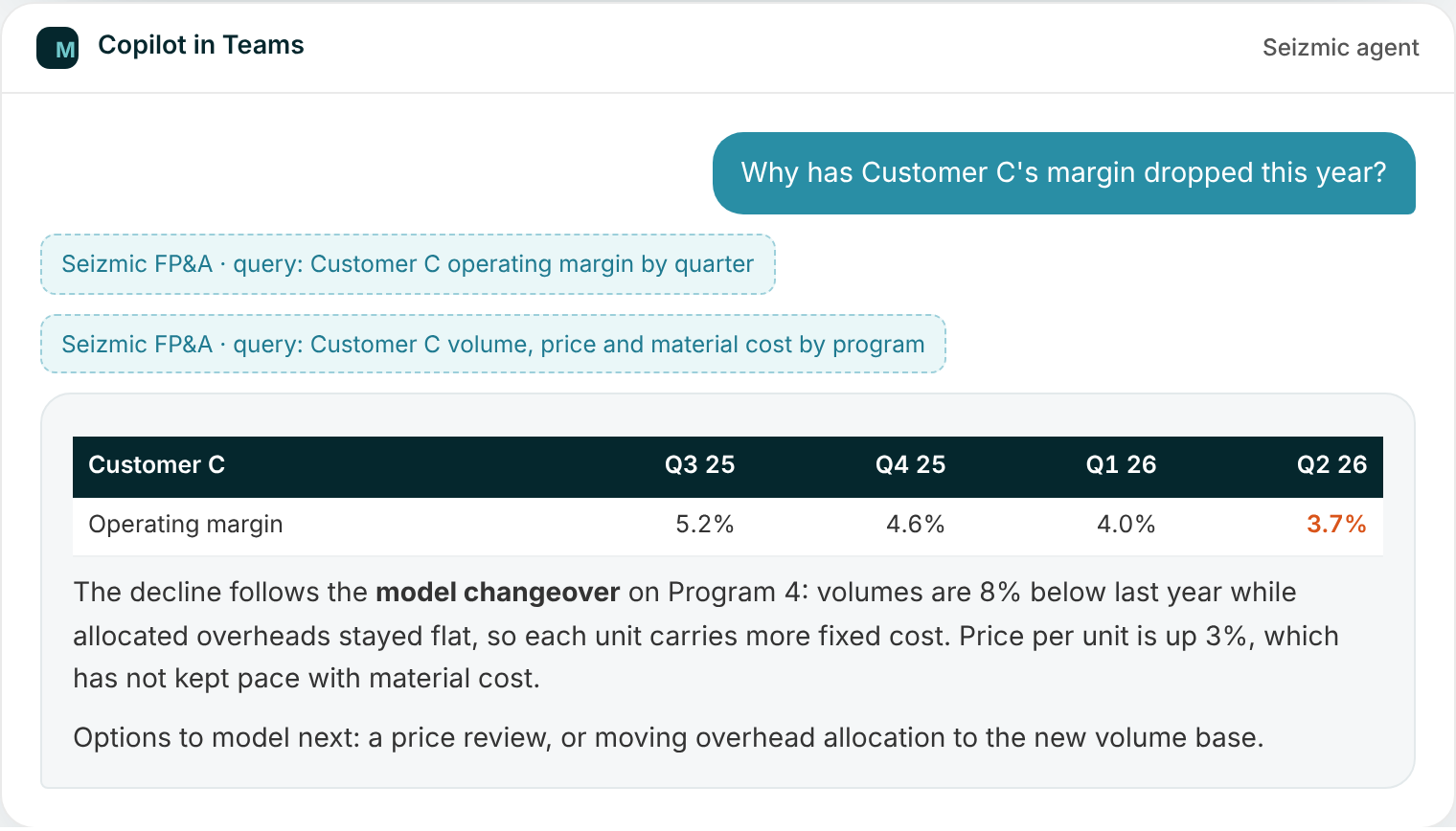
Illustrative conversations and data. Assistant wording varies; figures come from the Seizmic model.
Scenario planning
Scenario planning without building another spreadsheet
Finance teams spend days copying the forecast into a new workbook every time someone asks "what if". With Seizmic and an AI assistant, the scenario starts from the governed forecast and takes minutes.
1
Start from a governed baseline
The assistant pulls the budget or forecast version you name, with its period and load date, straight from Seizmic.
2
State assumptions in plain language
Volume, price, cost inflation, exchange rates, timing, by customer, program or entity. The assistant lists them back before it calculates.
3
Calculate from your cost structure
Changes flow through materials, freight, labor and overheads the way your model says they do, calculated in code, not guessed.
4
Compare, share, adopt
Side-by-side with budget and forecast, a bridge for the board, and an Excel workbook with the assumptions on their own tab.
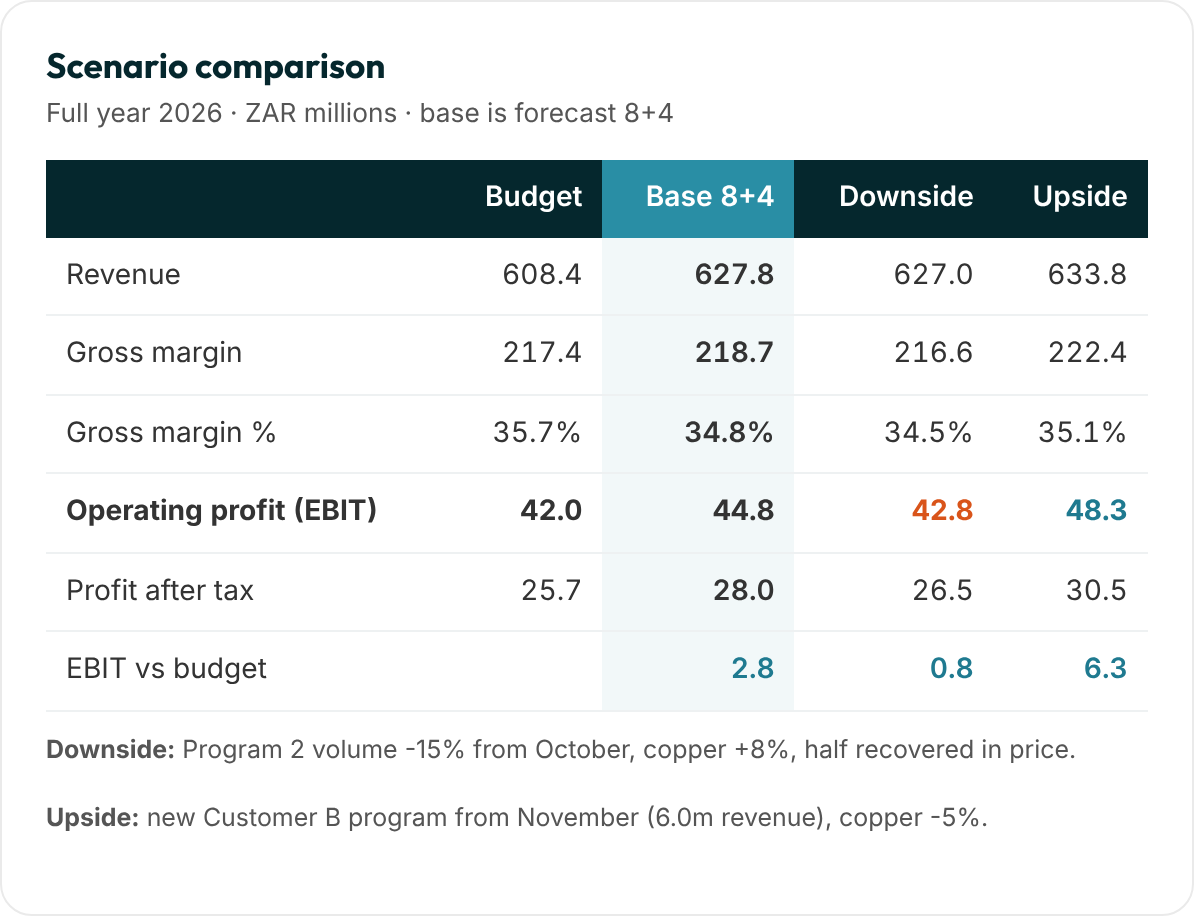
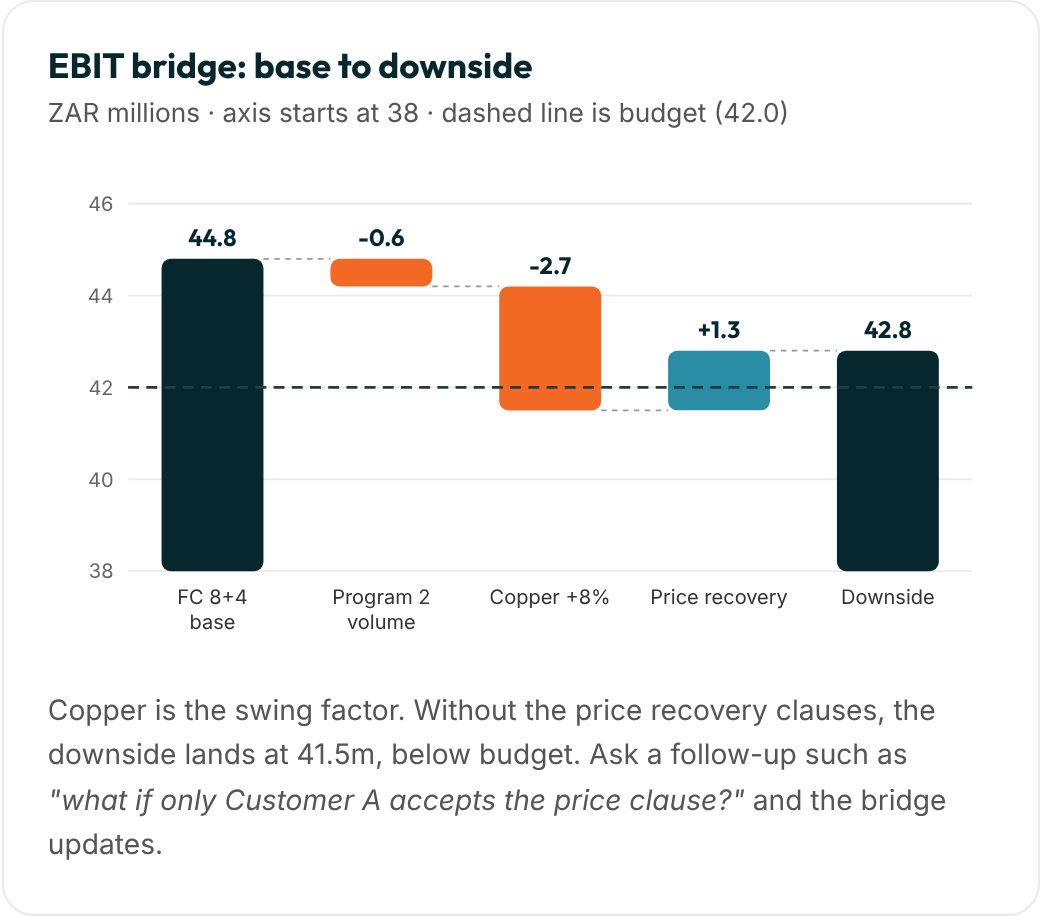
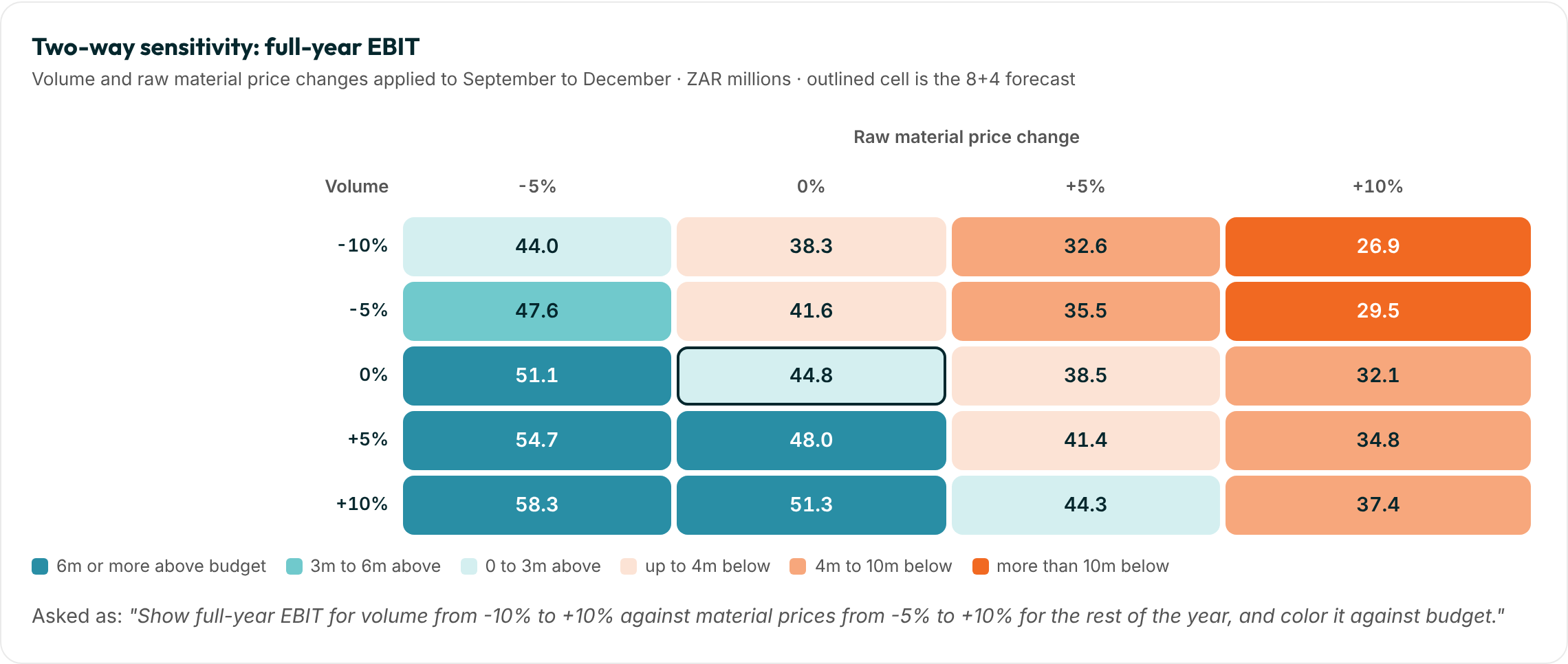
Read-only by design. Scenarios are calculated in the conversation from governed Seizmic figures. They never overwrite your ledger, budget or forecast. When a scenario becomes the plan, it is loaded as a new forecast version through Seizmic's controlled process, with the assumptions attached. [Confirm whether direct scenario save to a forecast version is on the roadmap.]
How answers stay reliable
Analysis your finance team can check
Language models are good at reasoning and writing, and the connector supplies the facts. These rules keep the two apart, so every answer can be audited.
Facts
Figures come from queries
Every actual, budget and forecast figure is queried from the Seizmic model through the connector, never recalled or estimated.
Baseline
Version and period stated
Answers name the version (Budget, 7+5, 8+4), the period and the entity, so nobody mixes up which numbers were used.
Assumptions
Listed before results
For any scenario, the assistant restates your assumptions and the ones it had to make, so you can correct them before relying on the output.
Arithmetic
Calculated in code
Flexing, bridges, sensitivities and goal seeks run as code or Excel formulas, so the maths is exact and can be repeated.
Traceability
Query and workings visible
Ask "show me the query" or "show your workings" at any point. Workbooks include an assumptions tab and live formulas.
Control
Same permissions as reports
The assistant runs as the signed-in user with row-level security. A plant manager's scenario only sees that plant.
Prompt library
Questions finance teams ask every week
A starting set by role. Recurring analyses can be packaged as reusable skills, so the same question is answered the same way every month.
CFO
Strategy and the board
Where will we land for the year, and what are the three biggest risks to that number?
What is the profit impact if our largest customer delays its new program by a quarter?
Draft a one-page board update on performance against budget.
How much headroom do we have before we breach the debt covenant?
Compare this year's margin bridge with last year's.
FP&A
Planning and forecasting
Build best, base and worst cases for the rest of the year.
What changed between the last two forecast versions, line by line?
Run a sensitivity on volume and material price against budget EBIT.
Which budget lines have weak or missing commentary?
Phase next year's budget using this year's seasonality.
Financial controller
Close and control
Which accounts moved more than 10% month on month, and why?
Reconcile the income statement total to the trial balance for August.
List unusual postings in overheads this month.
How does debtor ageing compare with the same month last year?
Draft the month-end variance commentary by cost center.
Commercial and operations
Customers and plants
Rank customers by operating margin after allocations.
What price increase do we need to pass on a 6% material increase?
How many units can we lose before the plant stops covering its fixed costs?
Split revenue growth into volume, price and mix by customer.
What is overtime costing us per unit this quarter?
How it works
MCP, explained in one picture
The Model Context Protocol (MCP) is the open standard that lets AI assistants connect to business systems. Anthropic introduced it and Microsoft supports it in Copilot. Seizmic provides an MCP server for your finance model, so any compatible assistant can use it safely.
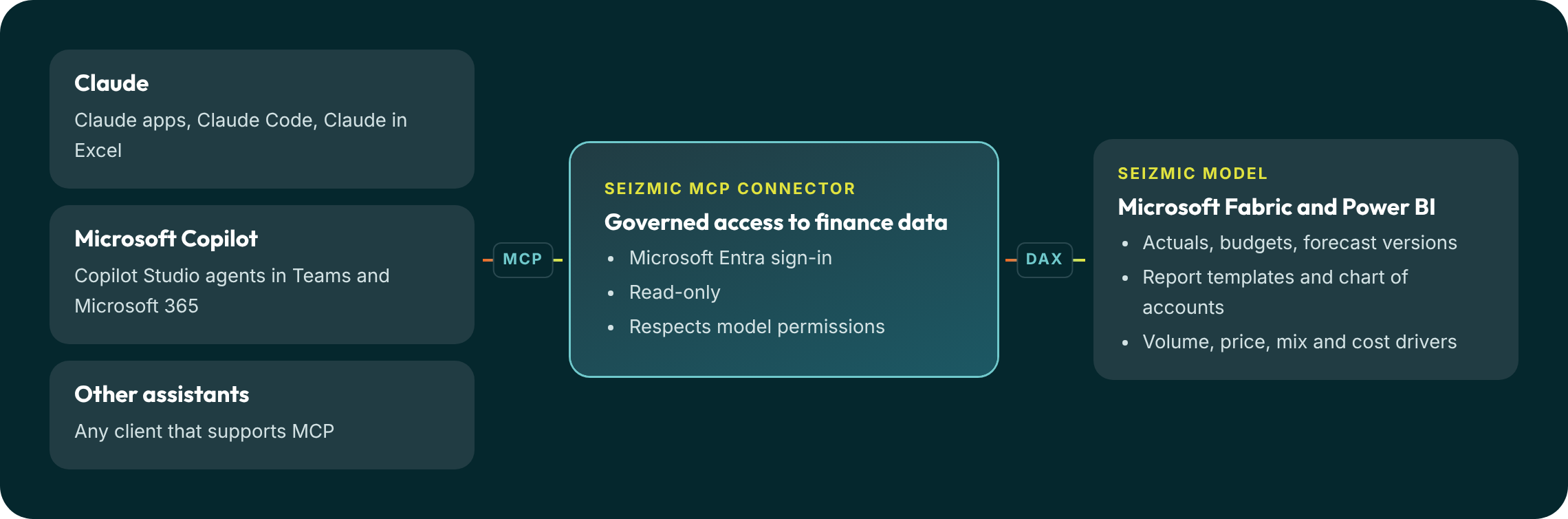
What the connector can do
Four capabilities, available to any MCP assistant
The connector supplies governed data. The assistant adds reasoning, calculation and writing on top, which is what makes scenarios and what-ifs possible.
Understand the model
Reads the tables, measures and relationships so the assistant knows what "gross margin" or "FC 7+5" means in your business.
Write the query
Turns a plain-English question into a precise query against your finance model.
Return live figures
Runs the query and returns the exact numbers from your actuals, budgets, forecasts and drivers.
Read report layouts
Uses your Power BI report definitions so answers match the statements your board already sees.
Where the answers land
From a question to a finished deliverable
In the chat
Answers and tables
Quick answers, comparison tables and charts, right where the question was asked, in Claude or in Teams.
Excel
Scenario workbooks
A formatted workbook with the baseline, assumptions, scenario and sensitivity on separate tabs, with live formulas.
Word and PowerPoint
Board-ready documents
Variance commentary, scenario summaries and board updates on your brand, built from live Seizmic figures.
Executives
Self-service answers
Leaders ask Copilot in Teams how a region or customer is tracking, or what a delay would cost, without waiting for an analyst.
Budget season
Review before sign-off
Find weak commentary, compare to prior year and forecast, and draft follow-up questions for each owner.
Repeatable work
Packaged as skills
Monthly scenario packs and recurring analyses are captured as instructions, so they are produced the same way every time.
Governance
AI access your auditors can approve
Signed in as the user. Every request authenticates with Microsoft Entra ID, so the assistant has the user's permissions and nothing more.
Read-only. The connector queries the model. It cannot change the ledger, budgets or forecasts, and scenarios stay in the conversation until you adopt them.
Same security as your reports. Row-level security on the Seizmic model applies to AI answers too.
Your data is not used for training. [Confirm per provider: Anthropic commercial terms, Microsoft Copilot data protection.]
Traceable. Every answer can show the query that produced it and the workings behind any calculation.
Wingman or your own assistant?
Use both
Wingman is the assistant built into Seizmic, ready on day one. The MCP connector brings the same governed data into Claude and Copilot, where your team already works. [Confirm whether Wingman itself runs on Claude through this connector.]
Setup
Connected in an afternoon
The connector is included with every Seizmic subscription. [Confirm.]
Step 1
Enable the connector
We register the Seizmic MCP server for your Microsoft tenant.
Step 2
Add it to Claude
An admin adds the connector for your Claude Team or Enterprise organization.
Step 3
Add it to Copilot
Add the MCP server as a tool in a Copilot Studio agent and publish it to Teams.
Step 4
Sign in and ask
Users sign in with their Microsoft account and start asking questions.
Questions
About AI connectors
What is MCP?
The Model Context Protocol is an open standard for connecting AI assistants to data and tools. It was introduced by Anthropic and is supported by Microsoft, so one connector works across Claude, Copilot and other assistants.
How can it do scenario planning if the connector is read-only?
The connector supplies the baseline: actuals, the forecast version you choose and the cost structure. The assistant applies your assumptions to those figures in the conversation and calculates the result. Nothing is written back, so your plan stays intact until you decide to adopt a scenario as a new forecast version.
Can we trust the calculations?
Figures are queried, not recalled, and calculations run as code or Excel formulas rather than mental arithmetic. The assistant lists its assumptions and can show the query and workings for every answer. As with any analysis, a finance owner should review scenarios before they go to the board.
Can we save a scenario?
Yes, as an Excel workbook with the assumptions on their own tab, or as a Word or PowerPoint summary. To make a scenario the official plan, load it as a forecast version in Seizmic. [Confirm the save-to-version workflow.]
Does the AI see all of our financial data?
No. Each request runs as the signed-in user, with the same permissions and row-level security they have on the Seizmic model. Data is fetched only to answer the question asked.
Can the AI change our numbers?
No. The connector is read-only. Budgets, forecasts and journals are changed only through Seizmic's controlled processes.
Which Claude and Copilot plans do we need?
[Confirm: Claude Team or Enterprise for organization-wide connectors; Microsoft Copilot Studio licensing for Copilot agents.]
Will answers match our reports?
Yes. The assistant queries the same model and measures your Power BI reports and board packs use, so the figures agree.
See Seizmic on finance data like yours
A 30 minute demo with someone who has built FP&A models, not a sales script.